Module 3 · Websites and game day
Football team websites and game day, under your brand
With Team Platform HQ, a recruiting agency gives the high schools and clubs it serves a football team website on the agency's own domain: roster, schedule, staff, sponsors, recruiting profiles and a game day program. Schools and clubs get it through their agency, not from us directly.
- Roster, schedule, results and coaching staff
- Recruiting profiles college coaches can trust
- Game day program and sponsors
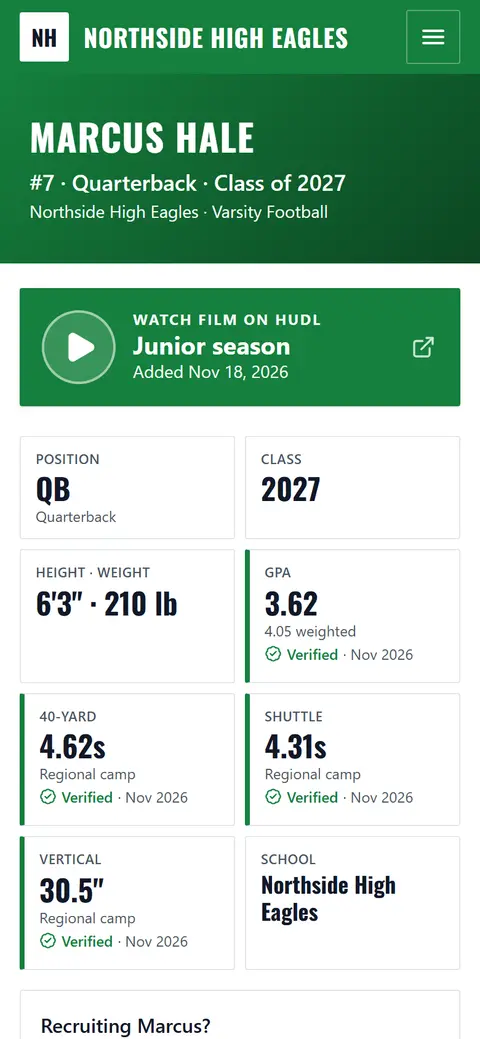
What's on a team site
Everything families, fans and college coaches look for, in the school's colors, on an address under your domain.
Roster
Numbers, positions and class years, with a filter by position. Each athlete is Private, Roster only or Public.Schedule and results
Games in the team's time zone, scores and the season record, updated from the admin in seconds.Recruiting profiles
Measurables, academics, offers and film for public athletes. Coaches verify results.Game day program
The next game on a phone: matchup, both rosters by number, seniors, coaches and sponsors.Sponsors
Sponsor logos on the site, "presented by" on game day, and a page with packages and an inquiry form.Coaching staff
Coaches with photos and titles for each team, and a contact for college coaches.
Their colors, edited with a live preview
The school or club picks a style and two colors and uploads its logo. The preview shows the real site as they go; text colors are picked for contrast, so any school colors stay readable.
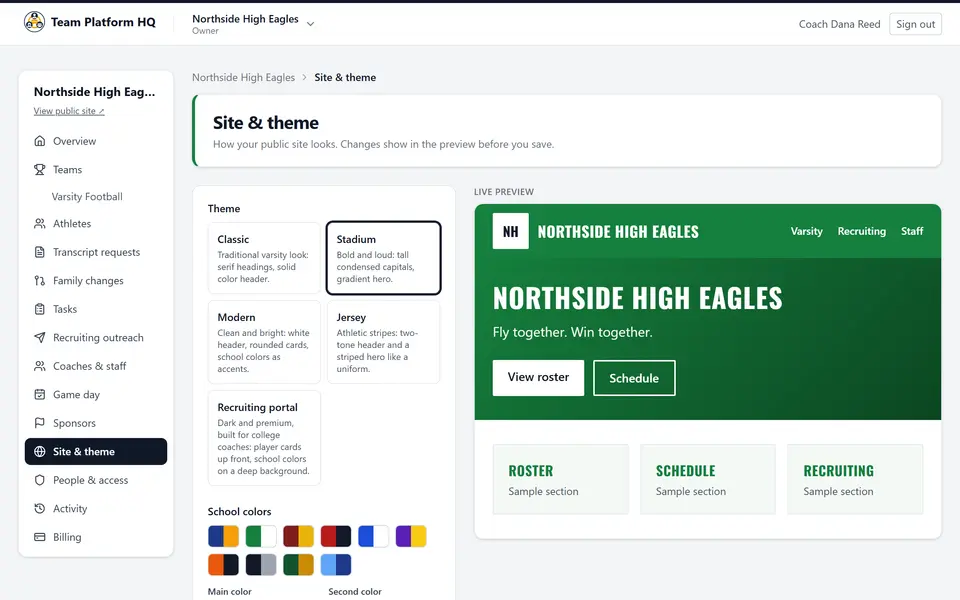
This is a team website editor, not a general website builder: the pages are made for football teams, and the content comes from the roster, schedule and athlete records your clients already keep.
Recruiting profiles college coaches trust
A verified number beats a big number. Coaches can tell the difference on every profile.
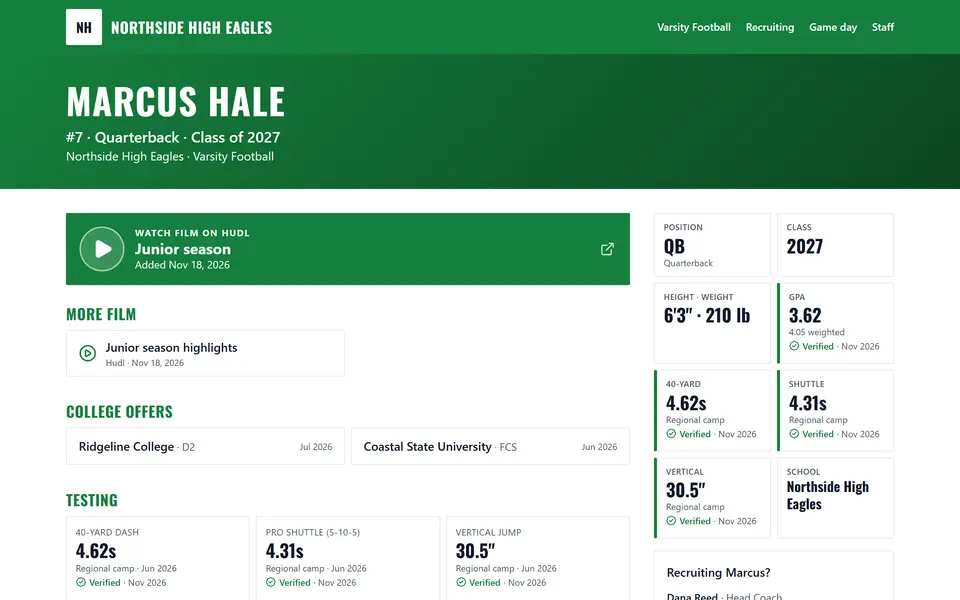
- A coach verifies each test result, GPA and offer. It shows as verified with the date.
- Facts a family enters are labeled self-reported until a coach checks them.
- Film links go to Hudl or YouTube. No video uploads to manage.
- College coaches can request a transcript from the profile. The family approves before the school sends it.
Each public profile has its own link-preview card, so it looks right when shared in texts and on social media.
Built right underneath
Phone first
Every page is designed for a phone screen first and checked for accessibility (WCAG 2.2 AA).Always readable
Text colors are picked for contrast with the school's colors, and the editor warns about hard-to-read choices.Found in search
Pages arrive fully rendered, with a sitemap, structured data and an llms.txt file for AI assistants.On your domain
Each site gets a secure address on your agency's site domain, like riverside.yoursites.com.Private by default
Private athletes never appear on the site or in search. Athletes' phone numbers and personal emails are never shown.Transcripts stay private
Never public. Sent only with consent, by a private link that expires after 14 days or 5 downloads.
How your clients get a site
Step 1: You add the school or club
From your partner console, on a plan you choose: Team $29, Club $49, School $149 a month, billed to your agency.Step 2: They make it theirs
A style, their colors and logo, with the live preview. About 10 minutes.Step 3: Add the roster
Paste it or import a spreadsheet. The schedule, staff and sponsors can come later.
Questions about team websites
How does a school or club get a team website, and how long does setup take?
Schools and clubs get a team website through their recruiting agency, which adds them from its partner console. After that, most teams set up their site in about 10 minutes: choose the teams, colors and logo, then add the roster by pasting it or importing a spreadsheet (Excel or CSV). Schedules, staff and sponsors can be added later.
What address does a school or athlete site get?
Every site gets its own secure (https) address on your agency's site domain, like riverside.yoursites.com. Your clients never see our domain.
What do team websites cost?
Team websites for the schools and clubs you serve are billed to your agency monthly: $29 for one team, $49 for up to 5 teams, and $149 for a whole school. Football only for now.
Are athlete profiles public?
Only if the team makes them public. On Team Platform HQ each athlete is Private, Roster only, or Public, and coaches choose. Private athletes never appear on the site, in search results or in the sitemap. Phone numbers and personal email addresses of athletes are never shown.
How are transcripts handled?
A college coach can request a transcript from a public profile. Team Platform HQ never shows transcripts publicly. The school sends one only with the family's consent, through a private link that expires after 14 days or 5 downloads.
Do you support other sports?
Not yet. Team Platform HQ is built for football: football positions and measurables, film on Hudl and YouTube, a directory of college football coaching staffs at every level (FBS, FCS, Division II, Division III, NAIA and junior college), and the football recruiting calendar. Other sports are coming based on partner demand, so tell us which sport you need.
Give the schools you serve a site in your brand
Sign up, add a school or club from the partner console, and their site can be live the same day.
Questions? Contact us